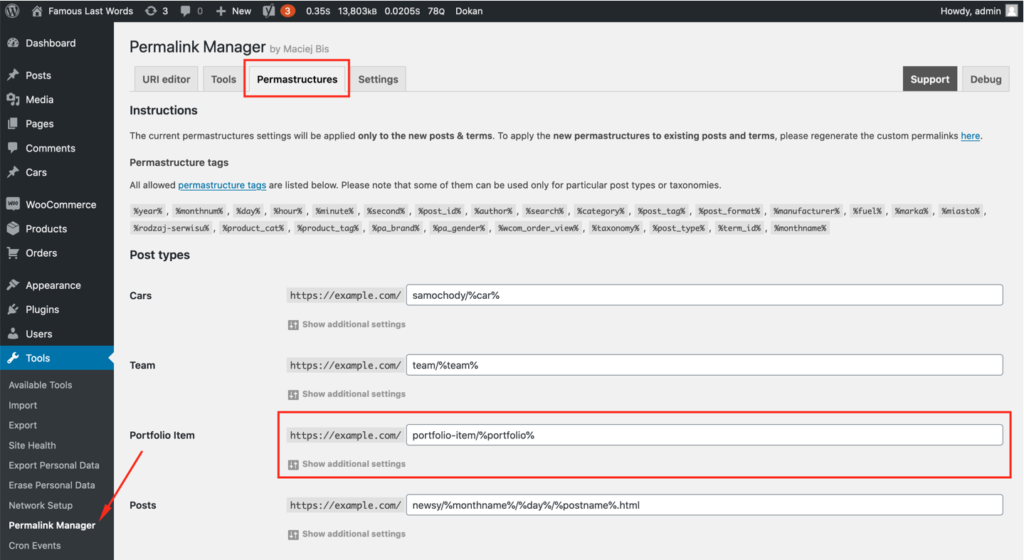
Permalink Manager supports many popular WordPress plugins. Some integrations require an additional code snippet to work as expected.
The list below covers the plugins users ask about most often and does not include every compatible plugin. If a plugin does not appear on the list, that does not necessarily mean it is incompatible with Permalink Manager.
If you have questions about compatibility with your plugins or theme, please use the contact form.
Forum/community plugins
bbPress
The free version of the plugin allows you to alter the permalinks for Forums, Topics, and Replies. To change Topic Tags permalinks, you will need the paid version (Permalink Manager Pro).
Buddypress
Unfortunately, Permalink Manager does not support Buddypress at this moment.
Asgaros Forum
To detect the URL addresses of the forums and subforums, Asgaros Forum uses a specific approach. The issue is that it may conflict with the Permalink Manager functions that identify custom permalinks. To ensure that both plugins work smoothly together please pick "Forum" page in Asgaros Forum plugin settings.
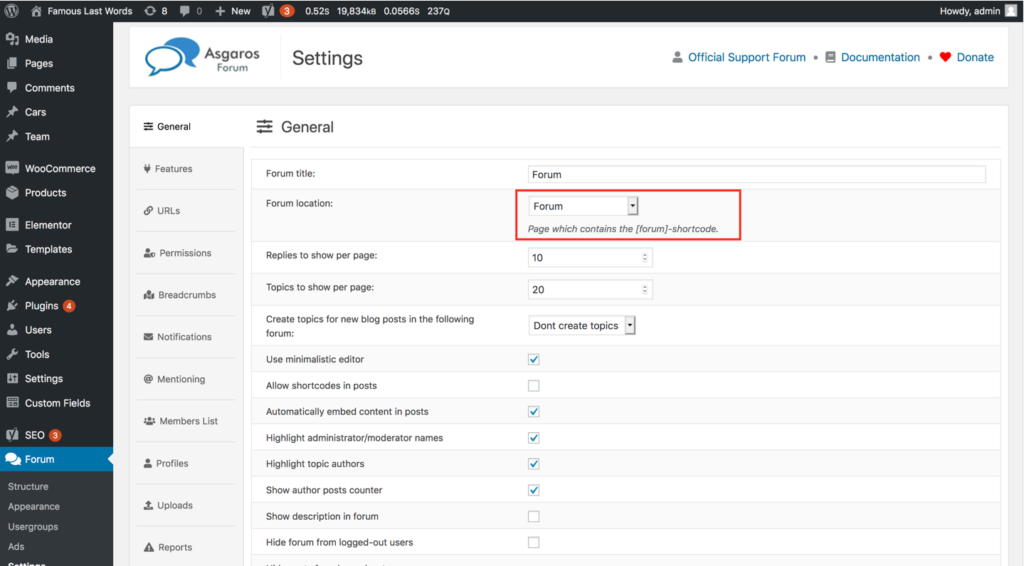
Additionally, please copy and paste the following snippet into functions.php in the (child) theme directory.
function pm_stop_redirect_forum() {
	global $wp_query;

	$wp_query->query_vars['do_not_redirect'] = 1;
}
add_action('asgarosforum_prepare', 'pm_stop_redirect_forum');
Directory plugins & themes
MyListing
Permalink Manager integrates with the MyListing theme, so you can set custom permalink structures for every post type and taxonomy the theme registers.
GeoDirectory
Permalink Manager may be used to customize the permalinks of any GeoDirectory-controlled custom post types (including "Places").

Default category support
Please put the below PHP code snippet into functions.php in the child theme directory to make Permalink Manager respect the "default category" selection inside the custom permalinks of "Place" post type.
/**
* Support primary term selected with GeoDirectory plugin (https://wpgeodirectory.com/)
*/
function pm_geodirectory_primary_term( $replacement_term, $post, $terms, $taxonomy, $native_uri ) {
	if ( ! $native_uri && ! empty( $post->post_type ) && $post->post_type == 'gd_place' ) {
		$gd_post = geodir_get_post_info( $post->ID );

		if ( ! empty( $gd_post->default_category ) ) {
			$primary_term = get_term( $gd_post->default_category, 'gd_placecategory' );
		}
	}

	return ( ! empty( $primary_term->taxonomy ) ) ? $primary_term : $replacement_term;
}
add_filter( 'permalink_manager_filter_post_terms', 'pm_geodirectory_primary_term', 10, 5 );
WP Job Manager
The free version of the plugin supports the permalinks of Job Listing items. Editing URLs of Job Types and other user-defined custom taxonomies is available with Permalink Manager Pro.
Dokan
Using an extra code snippet you can make Permalink Manager include store/vendor name in WooCommerce product permalinks. To take benefit of the snippet, you will need to paste it to functions.php file in your (child) theme directory. This would allow Permalink Manager to identify a new permastructure tag (%store%) for new product permalinks.
If you need to exclude the Dokan dashboard page from the Permalink Manager URI functions, a second code snippet is provided below. This code may be useful if Permalink Manager does not recognize the URLs of Dokan's dashboard sections.
/**
* Use %store% in Products' permastructure settings
*/
function pm_dokan_store_field($default_uri, $native_slug, $post, $slug, $native_uri) {
	// Do not affect native URIs
	if($native_uri == true || empty($post->post_type) || $post->post_type !== 'product') { return $default_uri; }

	if(strpos($default_uri, '%store%') !== false) {
		$store_name = get_user_meta($post->post_author, 'dokan_store_name', true);
		$default_uri = str_replace('%store%', sanitize_title($store_name), $default_uri);
	}

	return $default_uri;
}
add_filter('permalink_manager_filter_default_post_uri', 'pm_dokan_store_field', 3, 5);

/**
* Disallow Permalink Manager URI functions for Dokan dashboard
*/
function pm_exclude_dokan_dashboard($ids) {
	// Check if Dokan is activated
	if(function_exists('dokan_get_option')) {
		// Get Dokan dashboard page id
		$ids[] = dokan_get_option('dashboard', 'dokan_pages');
	}

return $ids;
}
add_filter('permalink_manager_excluded_post_ids', 'pm_exclude_dokan_dashboard');
Other WordPress plugins
Advanced Custom Fields (ACF)
Permalink Manager supports custom post types and taxonomies registered with ACF. You can remove post type and taxonomy slugs from URLs, as well as include taxonomy terms and custom field values in permalinks.
For more information, see the separate guide to configuring ACF permalinks.
BasePress
In order for Permalink Manager to support BasePress permalinks, the query parameters must be modified. You may accomplish this by using the code snippet below.
/**
* Support "Knowledgebase category" permalinks
*/
function pm_fix_basepress_query($query, $old_query, $uri_parts, $pm_query, $content_type) {
	global $basepress_utils ;

	if(!empty($pm_query['id']) && !empty($query['knowledgebase_cat'])) {
		$kb_category = $query['knowledgebase_cat'];

		$query = array(
			'post_type' => 'knowledgebase',
			'knowledgebase_items' => $kb_category
		);

		add_filter('basepress_canonical_redirect', '__return_false');
	}

	return $query;
}
add_filter('permalink_manager_filter_query', 'pm_fix_basepress_query', 3, 5);
WP All Export
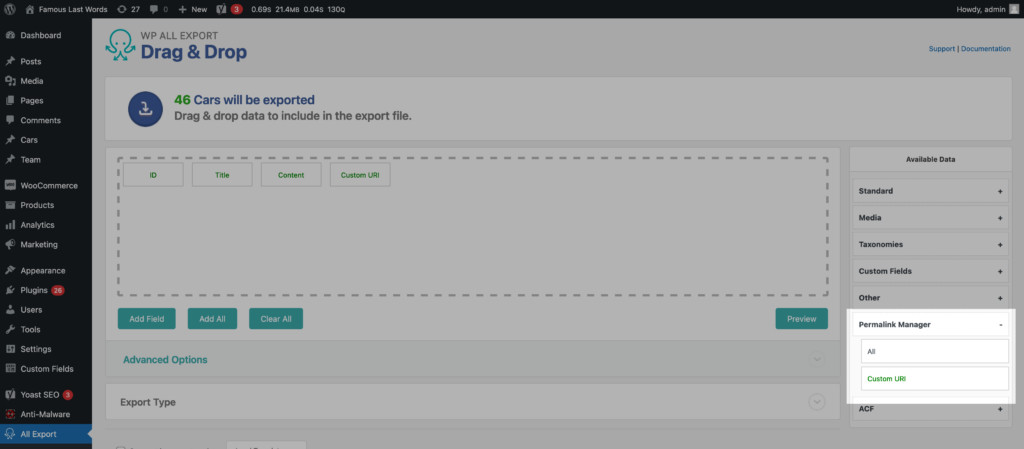
The WP Export plugin works in combination with Permalink Manager and allows you to include custom permalinks in your export dump. This can be useful if you want to bulk edit the data, for example using Excel.
To add the custom permalinks, simply drag the "Custom URI" field title displayed in the "Permalink Manager" section to the list of exported fields.
WP All Import
Using WP All Import to import posts, pages, custom post type items, or products can be made easier with the help of Permalink Manager. When importing, the plugin can be used to either import custom permalinks or automatically generate them.
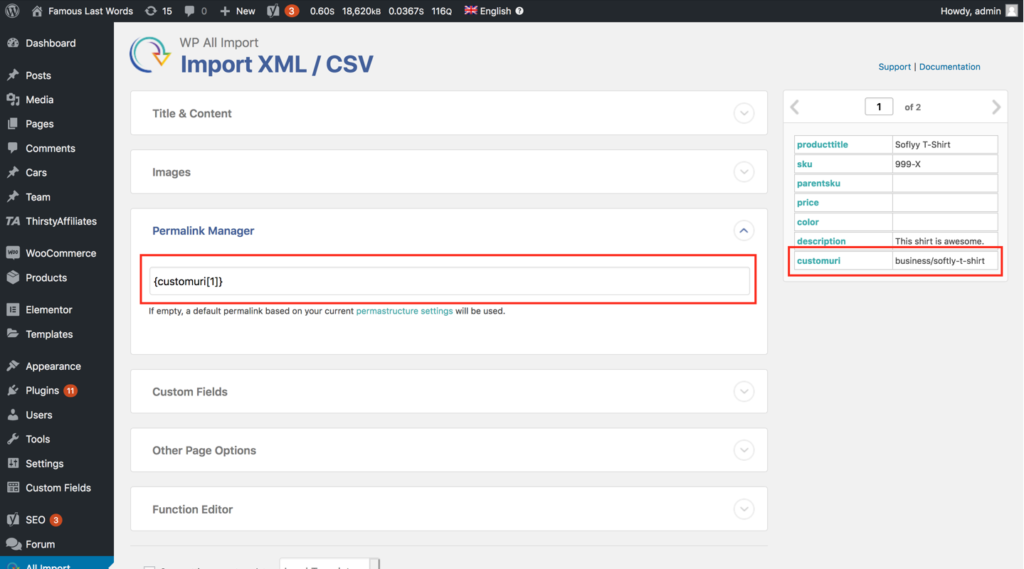
In order to import a custom permalink from an imported file, you must first drag the row containing the desired value from the left sidebar into the field in the metabox labeled "Permalink Manager". If this field is left blank, then Permalink Manager will automatically generate a new custom permalink based on your current settings for Permastructure.
This means that instead of using a complete URL (e.g. https://example.com/business/softly-t-shirt), you should use just the URI (e.g business/softly-t-shirt).
If this step is not followed correctly, Permalink Manager will not be able to process and import the field value correctly.
Custom Permalinks
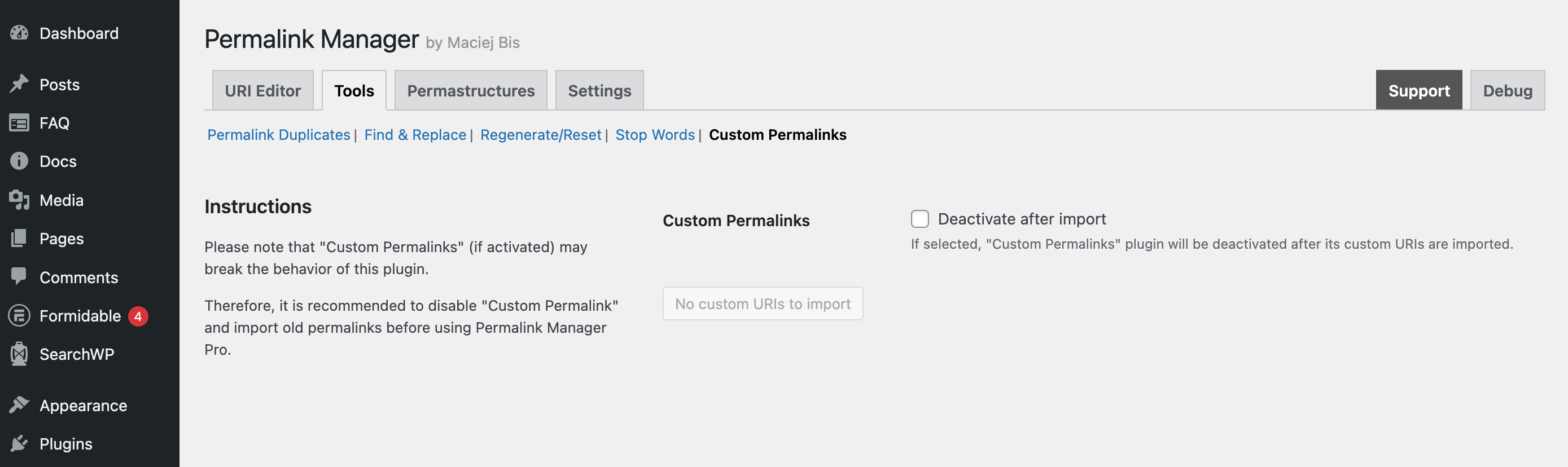
If you are switching from the "Custom Permalinks" plugin, Permalink Manager Pro has a built-in tool to migrate your existing URLs. You can find the it in the plugin settings under the Tools tab.
Learning Management System
Tutor LMS
Unlike the built-in hierarchical 'page' post type, 'courses' and 'lesson' are separate post types which are not linked together through '$post->parent'. This means that the %courses% tag will not be recognized by Permalink Manager as is.
In order to enable the use of the %courses% tag for the "lessons" and "quiz" post types in the Permastructure settings, an additional PHP code snippet is required:
/**
* Support %courses% tag (Sensei/Tutor LMS)
*/
function pm_replace_courses_tag( $default_uri, $native_slug, $post, $slug, $native_uri ) {
	// Do not affect native URIs or different post types
	if ( $native_uri || empty( $post->post_type ) || ! in_array( $post->post_type, array( 'lesson', 'tutor_quiz', 'tutor_assignments' ) ) ) {
		return $default_uri;
	}

	if ( strpos( $default_uri, '%courses%' ) !== false && function_exists( 'tutor_utils' ) ) {
		$course_id = tutor_utils()->get_course_id_by_subcontent( $post->ID );
		$course_title = ( ! empty( $course_id ) ) ? get_the_title( $course_id ) : '';

		$default_uri = str_replace( '%courses%', sanitize_title( $course_title ), $default_uri );
	}

	return $default_uri;
}

add_filter( 'permalink_manager_filter_default_post_uri', 'pm_replace_courses_tag', 3, 5 );
LearnPress
To avoid the redirect loop on LearnPress dedicated pages, please use the code snippet below.
/**
* Excluding the LearnPress pages from Permalink Manager
*/
function pm_exclude_learnpress_pages( $excluded_ids ) {
	if ( is_array( $excluded_ids ) && function_exists( 'learn_press_get_page_id' ) ) {
		$learnpress_pages = array( 'profile', 'courses', 'checkout', 'become_a_teacher' );

		foreach ( $learnpress_pages as $page ) {
			$excluded_ids[] = learn_press_get_page_id( $page );
		}
	}

	return $excluded_ids;
}
add_filter( 'permalink_manager_excluded_post_ids', 'pm_exclude_learnpress_pages' );

/**
* Disable canonical redirect if LearnPress query variables are detected
*/
function pm_fix_learnpress_wp_query( $query, $old_query ) {
	if ( ! empty( $old_query['view'] ) && ! empty( $old_query['page_id'] ) ) {
		$query['do_not_redirect'] = 1;
	}

	return $query;
}
add_filter( 'permalink_manager_filter_query', 'pm_fix_learnpress_wp_query', 3, 2 );
LearnDash
Permalink Manager currently does not support LearnDash out of the box. LearnDash is partially supported in Permalink Manager with a custom code snippet, however we can not guarantee full compatibility due to the complicated interactions between both plugins.
Themes
Voxel
Permalink Manager lets you customize permalinks for custom post types and taxonomies registered with Voxel theme, either individually or in bulk.
For example, you can use custom field values in URLs and include taxonomy slugs in custom post type permalinks.
Enfold theme