When you publish a post or page in WordPress, the slug goes through a sanitization process that strips or replaces characters considered unsafe or problematic in URLs. Dots are one of them.
Say your post title has dots, like "New version released: 1.2.3". WordPress will quietly drop those dots when saving the slug, so you get "new-version-released-1-2-3".
In this article, you will learn why that happens, why the obvious AI suggestions will not work, and how to keep the dots using a simple code snippet with no added security risk.
How WordPress Removes Dots From Slugs?
Behind the scenes, WordPress runs sanitize_title_with_dashes() function every time it saves or updates a slug. This function is triggered through the sanitize_title filter, and one of its jobs is to strip out dots.
Dots in slugs are unusual, and unexpected characters in URLs tend to cause more problems than they solve. A dot in a URL can look like a file extension (page.html), interfere with rewrite rules, or clash with how web servers handle certain requests.
That said, there are real use cases where keeping a dot matters. Think of version numbers, software releases, or content about domain names. In those cases, you may need a workaround.
Why Unhooking 'sanitize_title_with_dashes' is a Bad Idea
Many developers first try to remove sanitize_title_with_dashes from the sanitize_title filter completely. It seems logical, because that function strips dots from slugs, so unhooking it should keep them in place.
The problem is that this approach creates a real security risk. That filter does a lot more than remove dots. It handles encoding, removes HTML tags, strips invalid characters, and normalizes strings in ways that protect your database and URL structure.
If you unhook it completely, you lose all that protection. Raw, unfiltered input goes straight into your URL structure, which leaves the door open for code injection through post titles.
It is a big trade-off for a small fix, and it is not worth it. What you actually need is a more precise solution, one that keeps the dots while leaving everything else in place. That is exactly what the code snippet below does.
Alternative No-Code Solution
The code snippet below works without any extra plugins. But if you prefer to avoid working with code and do this the easy way, there is another way to get the same result.
If you would rather use a user interface, Permalink Manager allows you to control slugs on a per‑URL basis. You can include dots and other special characters inside custom permalinks without touching code.
The Safe Way to Allow Dots in WordPress Permalinks
You can allow dots without disabling slug sanitization. The idea is simple. Replace dots with a temporary placeholder before WordPress cleans the slug, then restore them after sanitization.
This approach does not require any extra plugin and It does not modify WordPress core or your server configuration. A few things worth knowing before you use the snippet:
- This solution does not disable WordPress sanitization. Everything else works as usual. Spaces become dashes, uppercase letters become lowercase, and other special characters are filtered out normally. The only change is how dots are handled.
- It covers new slugs automatically from the post title and when you manually edit the slug yourself.
- It also does not retroactively update existing slugs. If you have posts that were already saved without dots, you will need to manually update those slugs after adding the snippet.
The Code Snippet
We recommend adding the code snippet below to your child theme’s functions.php file. If you are not using a child theme, a site-specific plugin is a safer choice than editing your parent theme directly.
To insert the belwo code snippet, the recommended location is your child theme's functions.php file. If you do not use a child theme, a site-specific plugin is a better option than editing the parent theme directly.
How It Works?
Once the code snippet is in place, saving a post, page, or custom post type will no longer remove dots from the slug.


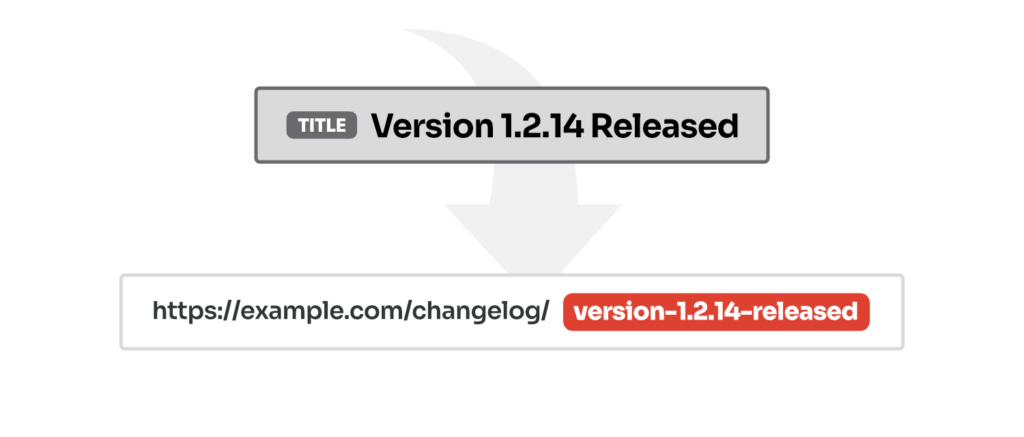
For instance, a title like "Version 2.5.3 Released" becomes the slug "version-2.5.3-released" with all the dots preserved.
SEO Impact
Dots in URLs are completely safe for search engines. RFC 3986 recognizes the period as a standard unreserved character, and Google’s URL structure guidelines allow standard characters and do not restrict dots.
The only potential issue is if you use a dot at the end of a slug (e.g., my-page.). Some server setups or CDNs may treat that as a different path. So keep dots inside the slug, not at the start or end.
If you change permalinks that are already indexed, search engines may need time to reindex them. If you change URLs on existing content, be sure to set up 301 redirects to preserve your rankings.
Frequently Asked Questions
Why Does WordPress Replace Dots With Hyphens?
WordPress replaces dots with hyphens for two reasons: safety and compatibility. It runs every slug through a function called sanitize_title_with_dashes() before saving it. That function is attached to the sanitize_title filter, and replacing dots with hyphens is one of its jobs.
- First, dots can be misinterpreted by web servers. In some setups, a dot in a URL looks like a file extension. For example, a slug like
about.pagemight be read as a file named "about" with an extension ".page". - Second, WordPress tries to keep URLs clean and predictable. The sanitization process turns special characters (e.g. spaces, dots, plus signs) into hyphens.
Can I Keep Dots in WordPress Category or Tag Slugs?
Yes, you can use the same trick for category and tag slugs. The built-in sanitize_title filter handles slug for all content types. The snippet hooks into that filter, so it covers taxonomy terms without any extra configuration.
Add the code to your functions.php file, then save or update the category or tag. The dot will be preserved in the slug the same way it is for posts and pages.
Leave a Reply