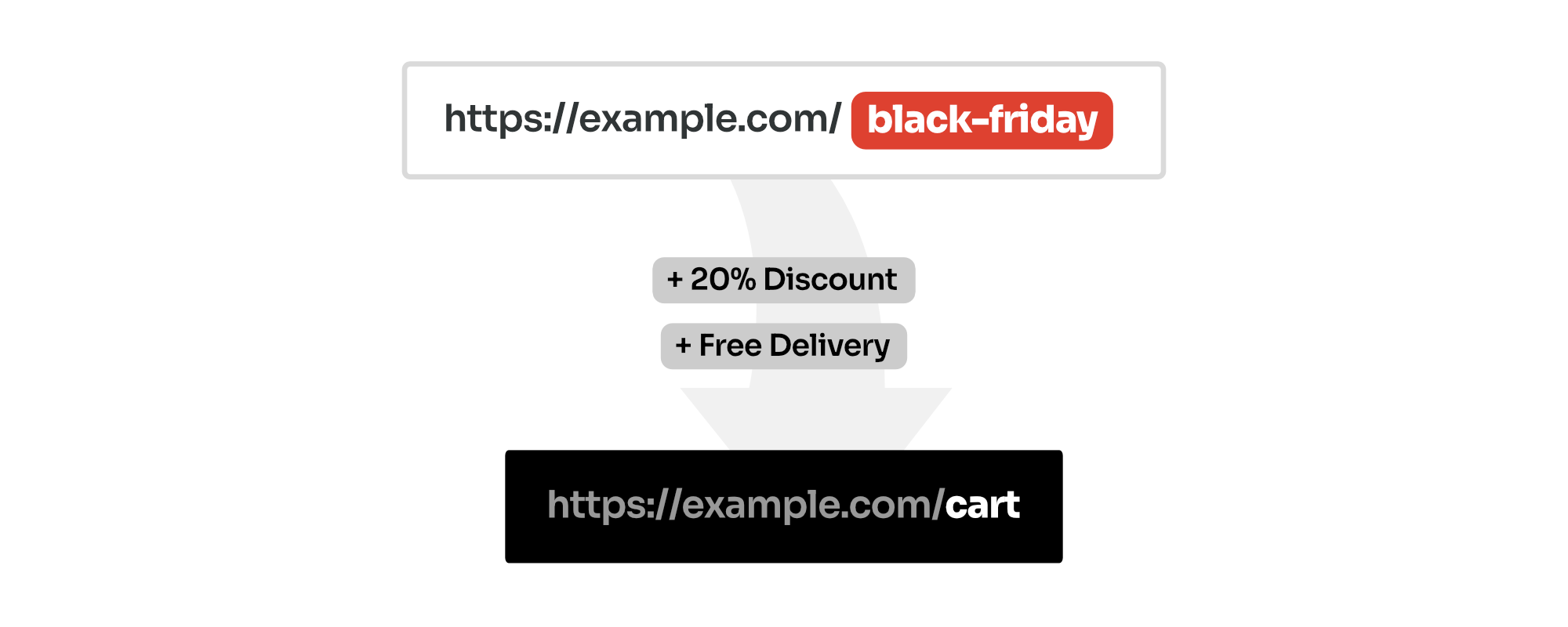
With Permalink Manager Pro, you can easily generate shareable WooCommerce coupon links. When a customer clicks the link, the coupon applies to their cart automatically.
This removes a step at checkout and helps lower your cart abandonment rate. You can fully customize the permalink so it looks like a standard page URL, while applying the discount in the background.
Coupon URLs configured with Permalink Manager can be used even when customers visits your store for the first time and their cart is empty. The discount will apply automatically when they add eligible items to their cart.
The features described in this article are exclusive to the Permalink Manager Pro and are not available in Permalink Manager Lite (free version).
How to Generate a Coupon URL
A coupon URL triggers a discount automatically. Instead of asking customers to copy and paste a code like
BLACKFRIDAY26
, you send them a link like
example.com/black-friday
. The coupon applies in the background, and the customer is redirected to your shop or cart page.
Permalink Manager Pro builds this feature directly into the WooCommerce coupon editor, so you do not need a separate coupon plugin or custom PHP code snippet.
Instructions
To define a custom permalink for coupon:
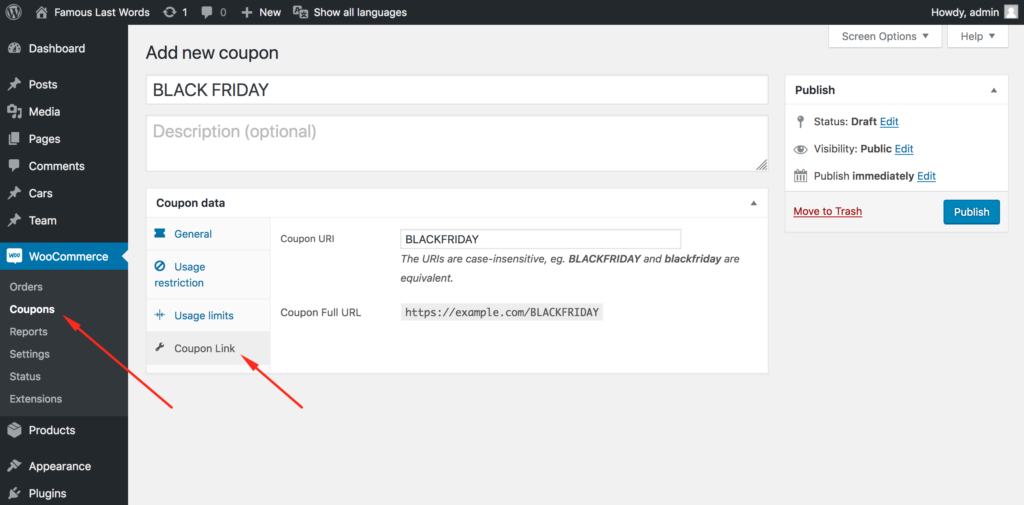
- Open the coupon you want to share in "WooCommerce -> Coupons" admin dashboard.
- Find the "Coupon Link" section.
- Enter a unique URI, such as
freedelivery. - Save the coupon.
The full URL will show up right below the text field. You can easily copy it to use in social media posts, marketing campaigns, or to share directly with your customers.
Coupon URLs are not case-sensitive, so both versions below will work:
https://example.com/FREEDELIVERY
https://example.com/freedelivery
How Coupon URLs Work?
What a WooCommerce Coupon URL Does?
A coupon URL connects a WooCommerce coupon code with a custom web address. Instead of entering a code like “SALE20”, the customer clicks a link and the discount is applied automatically.
How Permalink Manager Pro Handles Discount Code URLs?
When a visitor opens a coupon URL, Permalink Manager Pro automatically stores the detected coupon name in the WooCommerce session. WooCommerce does the rest, so all standard coupon rules still apply, including:
- Expiration dates
- Minimum/maximum order amounts
- Product restrictions
- Usage limits
- Any other coupon conditions configured in WooCommerce
This means you can use a custom, shareable URL for any coupon, while WooCommerce still decides if the discount can be applied.
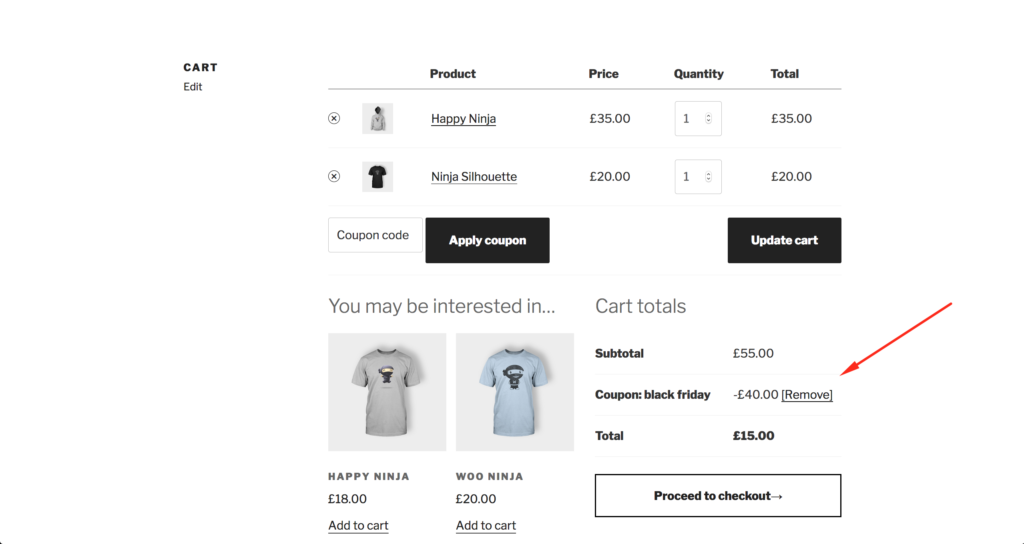
If the coupon is valid, the discount is applied automatically after the link is opened, and the customer is redirected either to the cart page or to the shop page when no items are in the cart.
Why Coupon Code Friction Is Costing You Sales
The global cart abandonment rate hit 70.22% in 2026 (Baymard.com, 2026), with mobile shoppers abandoning at 80.45% versus 68.62% on desktop (Dynamic Yield, 2025).
Coupon code fields are a friction point that's easy to underestimate. A customer sees an empty "enter promo code" box. They pause. They open a new tab and search for a discount. They find a code on a deal aggregator site, or a competitor's offer. They get distracted. They don't come back.
That sequence happens millions of times every day across WooCommerce stores, and it starts with a single visible form field. Coupon URLs eliminate this dynamic entirely. There's no field to notice, no code to remember, and no reason to leave checkout.
Why Custom Coupon URLs Beat Plain Discount Codes
They Remove the #1 Checkout Friction Point
Entering a promo code at checkout requires a customer to remember the code, locate the field, type it correctly, and wait for validation. Each of those micro-steps is a separate chance to abandon. A direct link collapses all four steps to a single click.
They Give You Clean Campaign Attribution
One code shared across all channels makes it impossible to know which campaign actually drove a conversion. Unique URLs solve this cleanly:
-
https://example.com/email-june→ email list performance -
https://example.com/ig-june→ Instagram results -
https://example.com/google-june→ paid search results
Check your analytics and you'll see exactly which channel converts — without needing UTM parameter strings cluttering every link.
They Look More Trustworthy
https://example.com/vip-sale
reads like a product page. A URL containing
https://example.com/?coupon_code=VIP26
reads like a tracking link or a phishing attempt. Clean URLs earn more clicks, especially on mobile where the full address is rarely visible.
They Work on Empty Carts
This is the detail that surprises most store owners: the discount doesn't require a product to be in the cart at the moment of the click. The coupon name stores in the WooCommerce session immediately.
A first-time visitor can click your link, browse your catalog, and see the discount applied when they're ready to buy — whether that's two minutes or twenty minutes later.
