WordPress prevents duplicate slugs by automatically adding numeric suffixes to your URLs. When you create a second page titled "Contact", WordPress changes its permalink, creating awkward URLs such as "contact-2".
Permalink Manager extends built-in permalink system by allowing custom permalinks for any post type or taxonomy. The plugin dynamically changes URLs in the front-end, including navigation menus, XML sitemaps, and canonical tags.
Your original slugs stay unchanged in the database, which prevents compatibility issues with other plugins and themes. You can assign any permalink format to custom post types and taxonomies and allow duplicate slugs where the default WordPress setup would not.
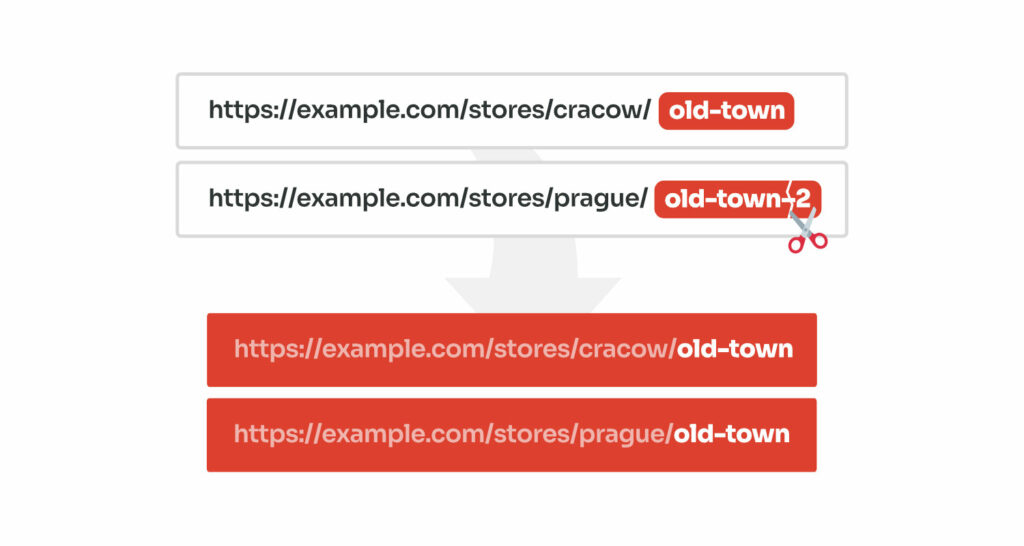
How Does WordPress Handles Duplicate Slugs
When you publish a post, page, or taxonomy term, WordPress creates a slug from the title. The slug is the part of the URL that identifies the item, for example (for "About us" page):
https://example.com/about-us/
WordPress requires each slug to be unique within the same content type and hierarchy. If a slug is already in use, WordPress handles this inside wp_unique_post_slug() function and adds a number at the end inside, e.g.:
- First page titled "About us" →
about-us - Second page titled "About us" →
about-us-2 - Third page titled "About us" →
about-us-3
This can be frustrating when you want to use the same title for multiple child pages or subcategories that belong to different parent items. You may want to use the same slug for e.g.:
- Hierarchical structures
Child pages under different parents, for example /marketing/contact/ and /sales/contact/. - Multilingual sites
Similar pages in different languages, such as /en/contact/ and/ /fr/contact/ when using WPML or Polylang.
Duplicate Slugs in WooCommerce
Things work a little differently when you are using hierarchical taxonomies, like product categories in WooCommerce. If you create two categories with the same name under different parent categories, WordPress automatically changes the slug.
Instead of adding a numeric suffix, it includes the parent category’s slug to make each URL unique.
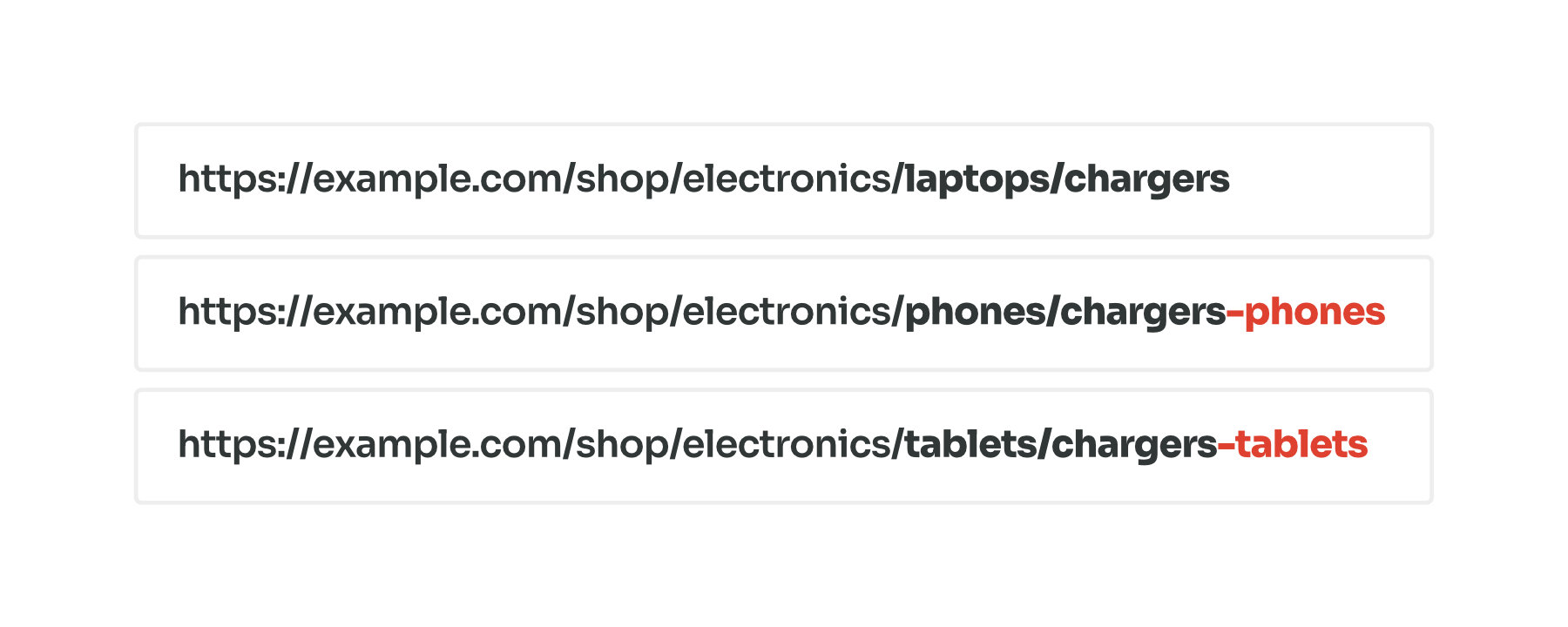
Take a look at the example above. WordPress automatically adjusts slugs for subcategories that share the same name, even when they are under different parent categories. Here is how it works:
- For your first category, the URL stays clean and exactly as you wanted:
https://example.com/shop/electronics/laptops/chargers - If you add another "chargers" subcategory under the different parent ("phones"), WordPress adds the parent's title to make the slug unique:
https://example.com/shop/electronics/phones/chargers-phones - The same happens if you add another "chargers" subcategory under "tablets". WordPress appends the parent slug again:
https://example.com/shop/electronics/tablets/chargers-tablets
This keeps each URL unique, but it can make permalinks longer. With Permalink Manager, you can reuse the same slug for different subcategories without WordPress adding the parent slug.
Why Does WordPress Force Unique Slugs?
When a visitor goes to e.g. https://example.com/about-us/, WordPress processes the request and extracts the slug (about-us). Using its rewrite rules, it determines which content type the URL matches and performs a database query based on that slug.
If multiple pages used the same slug (post_name), the query would return more than one result and WordPress could not determine which of them should be displayed.
To prevent this, WordPress requires each slug to be unique so that every single URL always points to a single page. Without this, WordPress would need to analyze other URL parts, such as categories or parent pages, to decide which item to display.
This would increase DB query complexity and reduce performance. Enforcing a unique slug avoids that overhead and allows to parse the URLs using a single, efficient query.
Reusing Slugs with Permalink Manager
Permalink Manager does not modify WordPress’s built-in slugs. Instead, it lets you define custom permalinks while keeping them intact. It overwrites original URLs with custom permalinks that you can adjust freely.
Permalink Manager takes full control of permalink handling and detects custom permalinks independently, so slugs do not have to be unique.
If you do not modify the plugin settings, the original slug is used also for new custom permalinks. If you want to allow duplicate slugs in the WordPress URLs and remove numeric suffixes like "-2" from them, you can choose one of two available solutions.
- You can manually remove the numerals appended to the individual permalinks.
- You can make Permalink Manager use the actual titles instead of native slugs in the custom permalinks.
Method 1: Manually Remove Numeric Suffixes
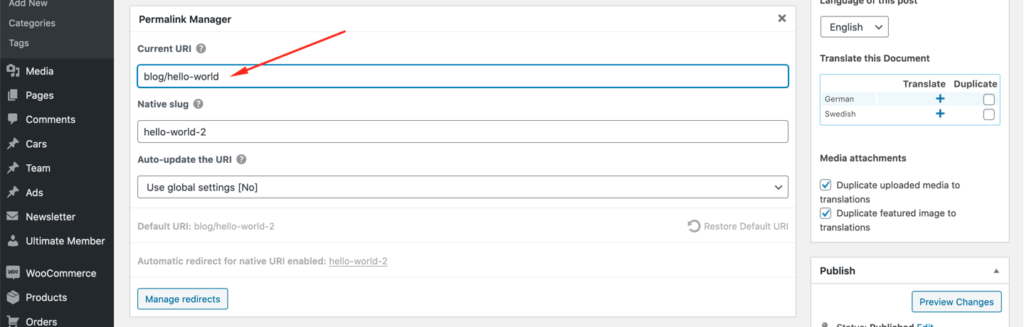
The easiest way to duplicate the slug is to remove the numerals directly in the content editor when changing the permalink. This method works well if you only need to update a few URLs, but it can take longer if your site has many pages using the same slug.
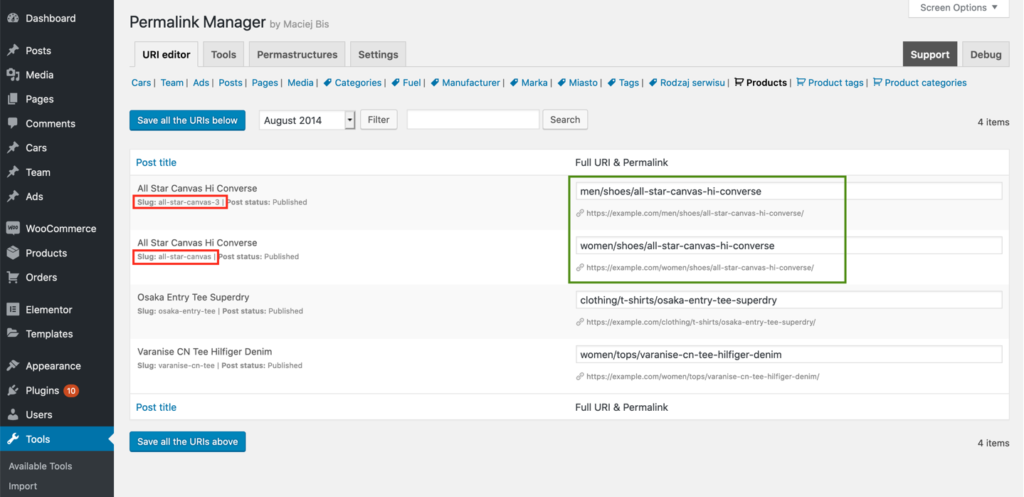
Method 2: Use Titles Instead of Slugs Automatically
Instead of adjusting each permalink by hand, you can make the process much faster. To simplify it, enable “Use actual titles as slugs (Force custom slugs)” under "Slugs mode" in the plugin settings.
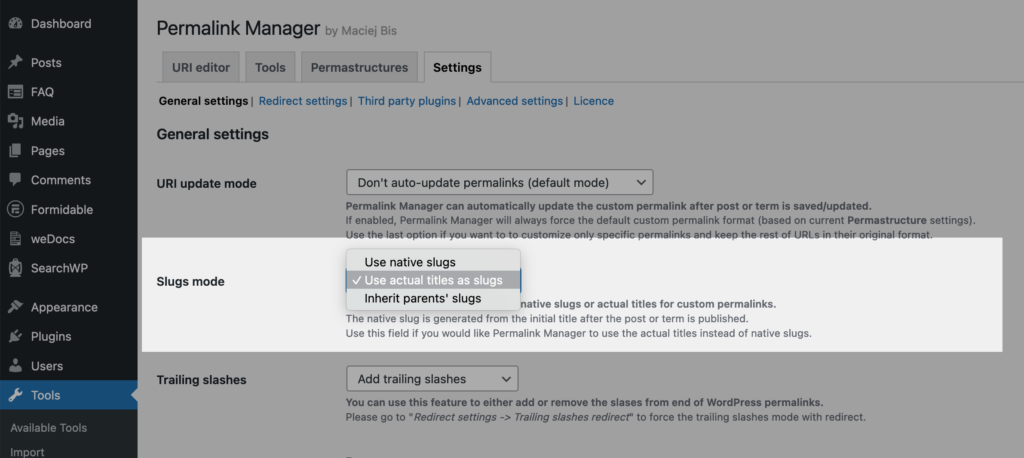
This changes how the plugin generates new custom permalinks for all content types. When enabled, Permalink Manager will always use the actual title (eg. “Shoes“) instead of the native slug (eg. “shoes-2“) in the custom permalink.
If you prefer not to apply this globally, you can adjust the slug mode for selected post types or taxonomies by replacing default tags like %product% or %product_cat% with %native_title%:

Preventing Duplicated Permalinks
Compared to the built‑in permalink system, Permalink Manager provides more precise control. It uses its own detection logic that checks the full URL rather than only the slug combined with the global permalink structure.
Thanks to this, the plugin can safely handle duplicated slugs and still resolve the correct URLs without generating 404 errors. If you want to review whether all custom permalinks are unique, follow the steps below to identify and fix them.
List of Duplicated Permalinks
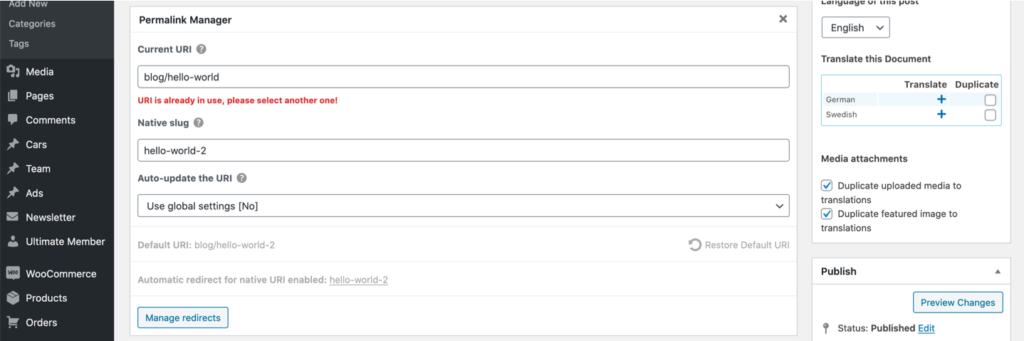
The plugin includes a soft‑error mechanism that notifies you about duplicate custom permalinks while editing a post or taxonomy term. When the permalink you enter is already in use, a notice is shown below the field.
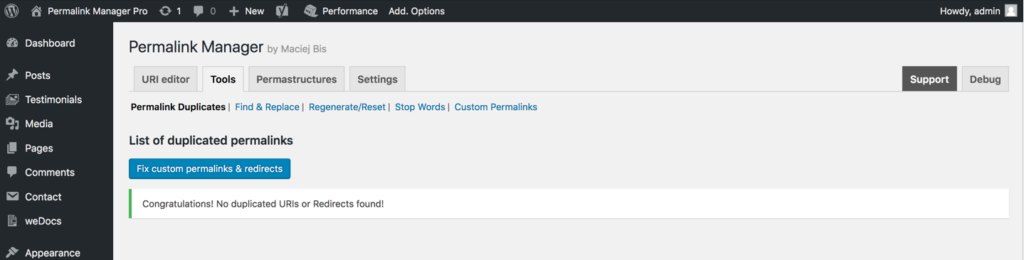
You can view all detected conflicts in a dedicated section, located in the admin panel under "Tools -> Permalink Manager -> Tools -> Permalink Duplicates".
How to Force Unique Custom Permalinks?
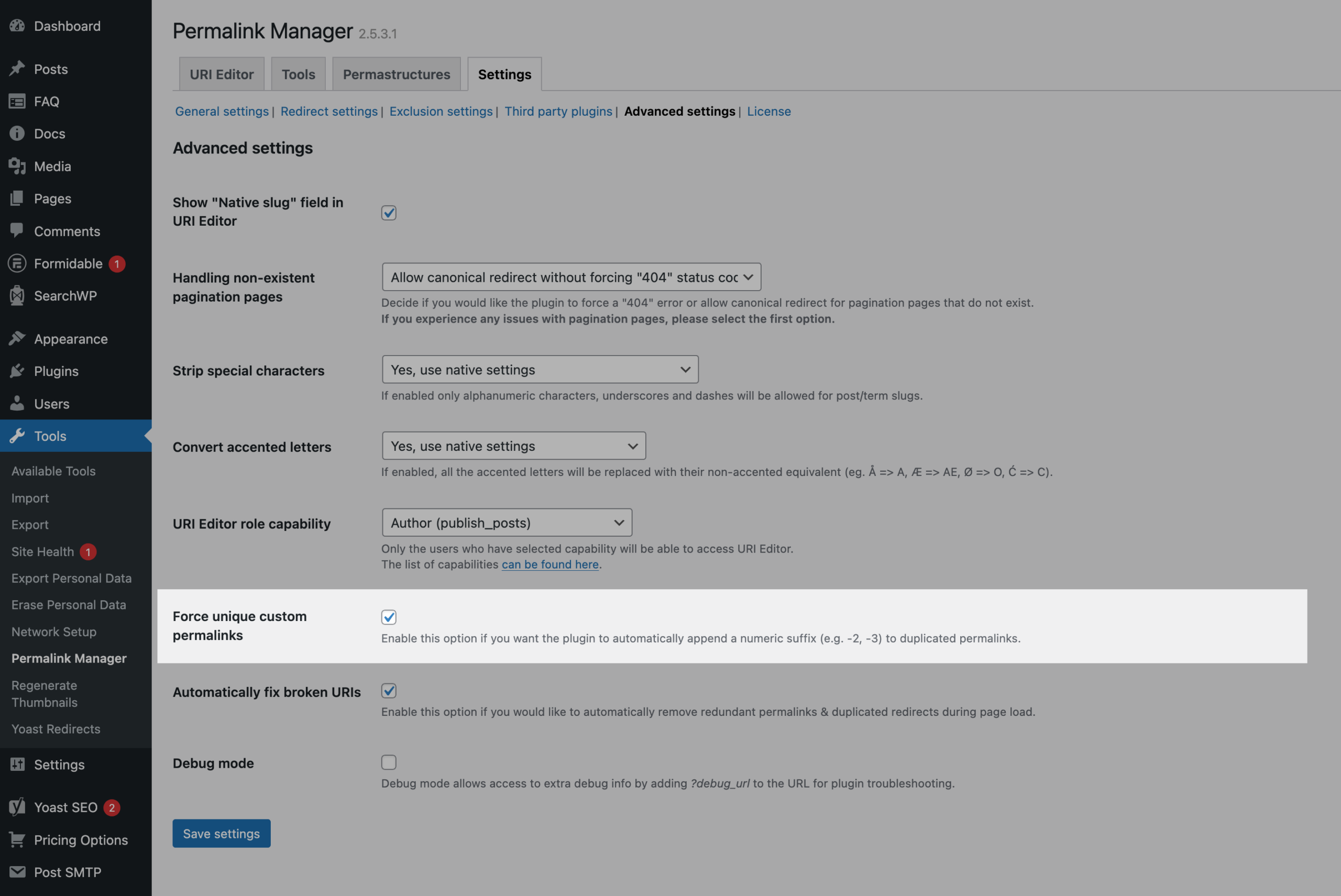
Permalink Manager includes a built-in functionality to keep your custom URIs unique. You can enable it under "Settings -> Advanced Settings -> Force unique custom permalinks" section.
When enabled, every new custom permalink is checked automatically. If the plugin detects a duplicate, it adds a numeric suffix such as -2 or -3 and keeps increasing the number until the permalink is unique.
FAQ & Troubleshooting
How to Fix -2 at End of WordPress URL?
When WordPress adds "-2" to the end of a URL, it means the original slug is already taken. This usually happens when two posts, pages, or custom post types' items use the same title. WordPress adds this number to avoid using the same URL twice.
Common reasons this happens:
- Another post or page uses the same slug
- A page with the same slug was deleted but still exists in the trash (database)
- A translation or draft uses the same URL
With Permalink Manager, you can set the exact URL you want and bypass WordPress slug restrictions. This makes it possible to use clean URLs even when WordPress automatically changes the slug and tries to enforce numbering.
Why Is WordPress Adding a “-2” to the Slug Even Though the Page Doesn’t Exist?
If you try to use a specific slug, such as /services/, but WordPress changes it to /services-2/ even though no other post or page uses that slug, it means the original slug is already "reserved" in the database. This usually happens in one of two cases:
- Trashed Pages and Posts
When you move a post or page to the Trash, WordPress does not delete it immediately from the database. It remains there for 30 days (by default) so you can restore it if needed. Even though it is not "live", the slug (post_name) is still kept in the wp_posts table. - Media Attachments Using the Same Slug
Every image or file you upload to the Media Library is treated as an attachment (built-in post type) and gets its own entry in the wp_posts table just like posts and pages. To fix it, you must find the image in the Media Library and either change its slug or remove it to "unlock" the slug.
Can I Use the Same Slug Across Different Languages? (Polylang & WPML)
Yes, when using WPML or Polylang, Permalink Manager allows you to use the same permalink slug across different language variants of your content.
For example, if you have an English page with the slug "about-us" and try to create a German version with the same slug, WordPress by default would normally change it to "about-us-2".
Using Permalink Manager, you can set identical slugs for different language versions of the same page or post. This means both your English and German pages can use "about-us" as their slug (with the language-specific URLs handled by your multilingual plugin's URL structure, such as "/en/about-us" and "/de/about-us").