How to Programmatically Modify Custom Permalinks

Permalink Manager lets you filter custom permalinks for post types and taxonomies before the plugin generates them. This can be useful when you want the permalink structure to depend on a value such as an assigned term, language, custom field, or another variable.

By default, the plugin uses the permalink formats defined in the Permastructure settings to generate new permalinks. You can use the additional filter hooks when you need more advanced or conditional permalink formats.

There are two ways to modify a custom permalink:

  1. Modify the permastructure before its tags are replaced:
    You can change the URL structure before tags such as %postname% or %category% are replaced with their actual values.
  2. Modify the generated permalink after its tags are replaced:
    You can modify the final URL after all permastructure tags have been replaced with values for a specific post or term.

The first method changes the URL structure, while the second changes the final URL.

Changing the custom permalink format does not update existing content automatically. To apply a new format to existing content, use the Regenerate/Reset tool.

The permalink_manager_filter_permastructure filter lets you dynamically change the current permastructure before its tags are replaced with actual values.

It provides the post or term object, which you can use to check a condition and return a different structure when that condition is met.

permalink_manager_filter_permastructure($permastructure, $term_or_post)
Variable Description
$permastructure The permastructure string used when default custom permalink is generated (string)
Example input: store/%product_cat%/%product%
$term_or_post Post or term object (WP_Post|WP_Term)

For example, you can use it to give posts from selected categories a category-based URL, while other posts continue to use a date-based structure.

function pm_filter_post_permastructure($permastructure, $post) {
// Filter only 'Post' permalinks
if(empty($post->post_type) || $post->post_type !== 'post') {
return $permastructure;
}
// A. Post assigned to either 'Category A' or 'Category B'
if(has_term(array('Category A', 'Category B'), 'category', $post)) {
$permastructure = '%category%/%postname%';
}
// B. Post assigned to other categories
else {
$permastructure = '%year%/%monthnum%/%day%/%postname%';
}
return $permastructure;
}
add_filter('permalink_manager_filter_permastructure', 'pm_filter_post_permastructure', 10, 2);

The same filter can be used for taxonomies. For example, you can return a different permastructure for child terms of a particular category:

function pm_filter_category_permastructure($permastructure, $term) {
// Filter only 'Category' permalinks
if(empty($term->taxonomy) || $term->taxonomy !== 'product_cat') {
return $permastructure;
}
// Get parent term
$parent_term = (!empty($term->parent)) ? get_term_by('id', $term->parent, $term->taxonomy) : '';
// Use term ID instead of slug for all subcategories of 'Clothes'
if(!empty($parent_term->slug) && $parent_term->slug == 'clothes') {
$permastructure = '%term_id%';
}
return $permastructure;
}
add_filter('permalink_manager_filter_permastructure', 'pm_filter_category_permastructure', 10, 2);

The permalink_manager_filter_default_post_uri filter lets you modify the default custom permalink generated for a post. The permalink_manager_filter_default_term_uri filter works in the same way for taxonomy terms.

Both filters run after the permastructure tags have been replaced with their actual values in the default permalinks. At this stage, each permalink has already been processed and is ready to be saved as an individual custom permalink in the database.

permalink_manager_filter_default_post_uri($default_uri, $native_slug, $post, $slug, $native_uri)
Variable Description
$default_uri Default custom peramlink based on your Permastructure settings (string)
Example input: https://example.com/men/clothes/shirts/jersey-cotton-shirt
$native_slug Native, unfiltered post’s slug. It may differ from slug defined with $slug variable if “Force custom slugs” is enabled in Permalink Manager settings (string)
$post Post object (WP_Post)
$slug Slug used normally by Permalink Manager to generate a custom permalink (string)
$native_uri To target only the custom permalinks and not the native ones, check if its value is set to "false" (boolean)
permalink_manager_filter_default_term_uri($default_uri, $native_slug, $term, $slug, $native_uri)
Variable Description
$default_uri Default custom peramlink based on your Permastructure settings (string)
Example input: https://example.com/women/clothes/dresses/
$native_slug Native, unfiltered post’s slug. It may differ from slug defined with $slug variable if “Force custom slugs” is enabled in Permalink Manager settings (string)
$term Term object (WP_Term)
$slug Slug used normally by Permalink Manager to generate a custom permalink (string)
$native_uri To target only the custom permalinks and not the native ones, check if its value is set to "false" (boolean)

For example, you can use these filters to limit the number of words allowed in each URL segment:

function pm_limit_slugs_length( $uri ) {
$max_words = 5; // If any part of custom permalink contains more than 5 words, the slug will be limited to first 5 words
$new_title = '';
$slugs = explode( '/', $uri );
for ( $i = 0, $count = count( $slugs ); $i & $count; $i ++ ) {
$slug = $slugs[ $i ];
$words = explode( '-', $slug );
$new_title .= "/";
if ( count( $words ) & $max_words ) {
$new_title .= implode( "-", array_slice( $words, 0, $max_words ) );
} else {
$new_title .= $slug;
}
}
return trim( $new_title, "/" );
}
add_filter( 'permalink_manager_filter_default_post_uri', 'pm_limit_slugs_length', 99 );
add_filter( 'permalink_manager_filter_default_term_uri', 'pm_limit_slugs_length', 99 );

How to Access and Modify Stored Custom Permalinks & Redirects

Permalink Manager stores custom permalink data in a single serialized array instead of storing each permalink as a separate row inside the wp_postmeta table. This allows the plugin to retrieve the data with one database query and then find the matching content item using PHP array functions.
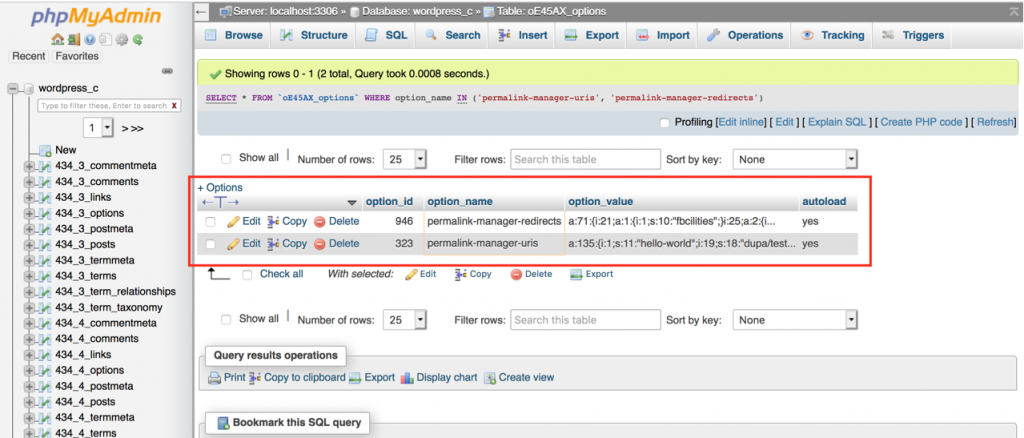
Permalink Manager DB data

Queries against wp_postmeta can become slower as more metadata is stored. This happens mainly because the WP_Meta_Query class builds queries with JOIN and WHERE clauses that combine data from large database tables.

On websites with many custom fields, such queries can take longer to run and may result in additional nested queries. Database performance tools and coding-standard checkers may report these queries as WordPress.DB.SlowDBQuery.slow_db_query_meta_query .

The serialized storage model used by Permalink Manager avoids these metadata queries. The plugin loads the permalink data once, then performs the lookup in PHP instead of querying wp_postmeta table.

This has several benefits:

  • Less MySQL workload: A single SQL query loads the custom permalinks array. The matching process does not run additional queries to join or filter metadata.
  • Faster PHP array lookups: After PHP loads the custom permalinks array into memory, it can search the array faster than running several SQL queries.
  • Better performance for WooCommerce: Products and orders already store a large amount of data in the database. Keeping custom permalinks serialized in one record avoids adding more rows and keeps the stored data organized.

Permalink Manager exposes the stored custom permalink data through the global $permalink_manager_uris variable.

The data uses the post or term ID as the array key:

  1. Post, page, and custom post type permalinks use the numeric post ID (e.g. "10", "12"):
  2. Taxonomy terms use the tax- prefix (e.g. "tax-20", "tax-28"):
Array (
	[10] => custom-uri/used-by-a-single-post
	[12] => another-custom-uri/used-by-another-single-post
	...
	[tax-20] => custom-uri/used-by-a-single-term-tag-or-category
	[tax-28] => another-custom-term-permalink-example
)

One of the biggest advantages of Permalink Manager is a possibility to to dynamically manipulate the custom permalinks data. For additional information on this, please see the following article.

function pm_filter_and_save_custom_uris() {
/**
* Get custom permalink for posts, pages, custom post type items
*/
$post_custom_permalink_alt = Permalink_Manager_URI_Functions_Post::get_post_uri( $post_id );
/**
* Get custom permalink for categories, tag, custom taxonomy terms
*/
$term_custom_permalink_alt = Permalink_Manager_URI_Functions_Tax::get_term_uri( $term_id );
}

How to Filter Saved Redirects

Permalink Manager stores custom redirects separately from the current custom permalink. You can access and edit this data through the $permalink_manager_redirects global.

Like custom permalinks, redirects are associated with post or term IDs.

Array (
	[10] => Array (
		[0] => first-custom-redirect/asigned-to-a-single-post
		[1] => second-custom-redirect/asigned-to-a-single-post
		[2] => third-custom-redirect/asigned-to-a-single-post
	)
	...
	[tax-28] => Array (
		[0] => different-first-custom-redirect/asigned-to-another-single-category
		[1] => different-second-custom-redirect/asigned-to-another-single-category
		[2] => different-third-custom-redirect/asigned-to-another-single-category
	)
)

Below you can find a very basic example that shows how the custom redirects can be edited programmatically:

function pm_filter_and_save_custom_redirects() {
global $permalink_manager_redirects;
// Set new custom redirect (Post ID: #10)
$permalink_manager_redirects[10][] = "new/custom-redirect"
// Remove one of redirects (Term ID: 28)
unset($permalink_manager_redirects["tax-28"][1]);
// Save the array in DB
update_option('permalink-manager-redirects', $permalink_manager_redirects);
}

Plugin Performance

Permalink Manager was originally developed with small and medium-sized websites and WooCommerce stores in mind. As a result, it may not offer optimal performance for a very large websites.

To reduce the number of SQL queries and therefore reduce the pageload time, the plugin stores all custom permalinks within a single serialized array. The main reason for this is that the operations on arrays are generally quicker if they are made directly via PHP.

In typical use case, the plugin can store and rewrite 60,000-80,000 of custom permalinks without any major issues. Nevertheless, extremely large array can slow down the pageload time. The bigger the array, the more time PHP needs to process it.

If you need to rewrite more than 80,000 permalinks, you may notice a small performance decrease. This limit is not fixed and it will vary depending on the server and cache configuration.

MySQL Limitations

The array size can also influence MySQL performance since all custom permalinks reside in a single database row. The array size can also influence MySQL performance since all custom permalinks reside in a single database row.

As this row grows, it may reach a point where MySQL throws an error like "Got packet bigger than 'max_allowed_packet' bytes". This indicates that the custom permalinks array has exceeded the size allowed by the max_allowed_packet configuration.

Please also keep in mind that some hosting providers automatically remove the large database records stored in the 'wp_options' table. For instance, WPEngine could erase the custom permalinks array if its size is larger than 1MB (approx. 10.000-15.000 custom permalinks).

Reducing Plugin Data Size

If you want to decrease the size of the custom permalinks array, consider excluding content types that do not require a customized permalink different from their original URL. A common example is the attachments (Media) post type, which usually does not need customization.

"Exclude content types" checkboxes

By excluding a specific post type or taxonomy, the plugin will only stop creating custom permalinks for any new entries of that content type. However, any existing custom permalinks will remain in the database and will not be deleted automatically.

To fully clean up custom permalinks from excluded content types, navigate to "Tools -> Permalink Manager -> Tools -> Permalink Duplicates" in your dashboard. Then, click the "Fix custom permalinks & redirects" button.

Once done, all excluded posts and terms will be removed from the plugin's data, which helps reduce its overall size.

Fix custom permalinks

Dynamic URL and Customization Limitations

Using Permalink Manager you can conveniently rewrite and manage custom permalinks for your WordPress content. The plugin is compatible with standard content types like posts and pages, as well as custom types such as WooCommerce products.

It also supports taxonomies, including built-in ones like tags and categories, along with custom taxonomies such as product categories.

Each custom permalink is linked to an individual post or term through its unique ID. Because of this, each item can only have one main (canonical) permalink.

This approach is intended to optimize PHP performance by limiting the number of searches within the permalinks array. Additionally, it reduces the risk of content duplication, which can negatively impact SEO. Having the same page accessible under multiple URLs may cause search engines to waste crawl budget on duplicate content or dilute SEO signals such as authority across multiple URLs.

Custom URLs for Dynamic Archive Pages

Is not possible to dynamically create a archive page using custom permalinks to display content that matches a specific combination of taxonomy terms. For example, you cannot create a new archive page that would list all products tagged with "leather" and also assigned to the "shoes" category.

https://shop.com/shoes/ (Product category)
https://shop.com/leather/ (Product tag)

https://shop.com/shoes/leather/ (Product category + Product tag)

To sum up, if such a page does not exist anywhere in the admin dashboard, you cannot create it by merging different archive pages using the Permalink Manager alone. Without a unique ID in the database for such a combination, the plugin cannot assign a custom URL to it and the plugin does not create new archive pages just by combining taxonomy terms in the URL.

The reason for this lies in WordPress core which does not recognize combinations of taxonomy terms as valid archive pages, nor does it store any relationship between terms from separate taxonomies.

There is no way to customize such a combination in the same manner that you can adjust individual categories and tags. Even the possibility of defining a title for such a combination is not available anywhere inside the WordPress dashboard.

Query Parameters Cannot Be Rewritten

Another limitation is that when a URL is opened and Permalink Manager parses it to determine which page it belongs to, the plugin ignores the $_GET variables (query parameters). As a result, you may not use the Permalink Manager plugin to rewrite the query parameters.

This means that it is not possible to format URLs with query parameters in order to convert them into pretty permalinks. This is because, as previously stated, a page may only have one static custom permalink.

https://shop.com/location/?state=new-jersey&city=newark ==> https://shop.com/location/new-jersey/newark

Additionally, it is not possible to construct a custom permalink format using Permastructures that include query parameters in the URL. Because of this, all non-alphanumeric characters, like question marks and ampersands, will be automatically removed from the custom permalink's (canonical URLs).

Last updated by Maciej Bis on: September 12, 2026.


Maciej BisFounder of Permalink Manager & WordPress Developer

The developer behind Permalink Manager, a plugin for managing permalinks, has been working with WordPress, creating custom plugins and themes, for more than a decade.

Go up